How to record an async sales video
- sales
- prospecting
- async video
Keep it under ninety seconds, open on something specific to the person you are sending it to, and put your face in a corner rather than filling the frame. Record the region of the screen that carries the point instead of the whole desktop. KlipKap Pro exports directly to the LinkedIn, X and vertical ratios, and everything including the prospect research on your screen stays on your machine.
01Ninety seconds, and mean it
A sales video is competing with a subject line, not with other videos. Ninety seconds is the point past which completion rates fall off sharply, and a video nobody finishes is worse than the email it replaced, because it also asked for a click.
The discipline that gets you there is deciding what the video is for. One video, one ask. If it needs to establish a problem, demonstrate a fix and propose a meeting, it is three videos or it is a call.
- Say why you are recording for this person specifically, in the first ten seconds
- Show something on screen that they will recognise as theirs
- Make one ask at the end, and make it small
- Do not open with your company name; they can read that in the signature
02Put their world on screen, not your deck
The strongest opening in an async sales video is their own site, their own job posting, their own product, on screen while you talk. It is proof the video was made for them, which is the only thing that distinguishes it from a template.
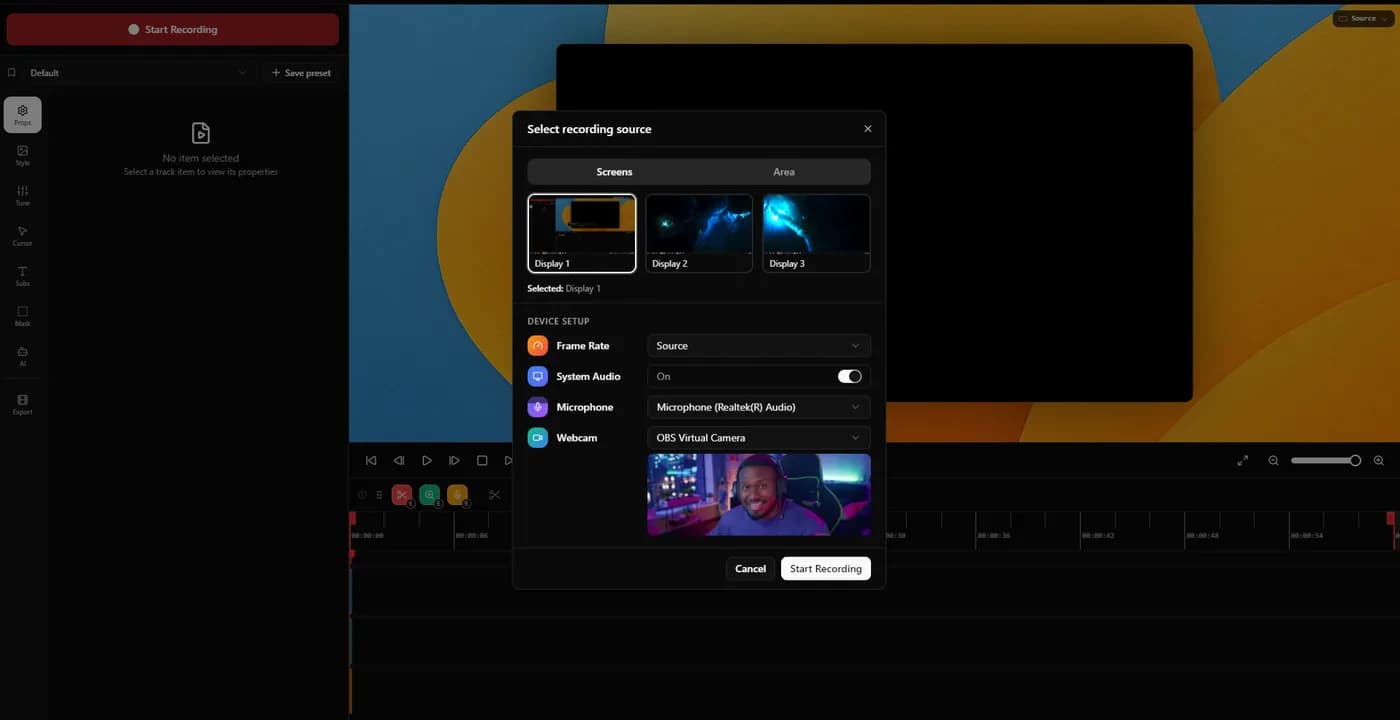
The Area tab crops the capture to a region you draw, so you can frame one section of a page rather than a browser window with your bookmarks bar and fifteen tabs across the top.
03A face in the corner, not a face filling the frame
The webcam sits in one of eight positions on a 3x3 grid, sized between 5 and 40 percent of frame height, with a corner radius that runs from square to a full circle. A 1.0x to 3.0x digital zoom crops into the camera feed itself, which handles a badly framed laptop camera without moving the laptop.
Small and cornered works better here than in any other kind of screen recording. The point of the face is to prove a person made this; the point of the screen is the argument.
04Sound like you are in a room, not a corridor
Audio is what makes a prospecting video feel cheap. Six voice processing controls handle it after the fact: cleanup, adaptive noise suppression, bass boost, voice clarity, voice boost and a de-esser at around 7 kHz, applied at export rather than baked into the recording. These are Pro tier features.
Microphone and system audio are separate tracks with independent volume, so a notification chime during the take does not cost you the whole recording.
05Cut the thinking time
Automatic silence trimming removes the silent stretches, which on a first take is where most of the ninety seconds went. The Pro tier includes it, and on this kind of video it is often the difference between sending the first take and recording a fourth.
Recording is controlled from the tray and paused segments are stitched back together, so you can pause while you find the page you meant to show rather than starting again.
06Assume it gets watched on mute
A sales video is opened on a phone, often between other things, frequently without sound. Word level captions with progressive highlight keep it followable in that state, and they are transcribed on your own machine rather than through an API. Transcription is a Pro tier feature.
The practical effect is that your first sentence has to work as text. Write it as though it will be read rather than heard, because half the time it will be.
07Export for where you are sending it
Six aspect ratios cover YouTube, TikTok and Instagram, X, LinkedIn and Facebook, plus the source dimensions. A LinkedIn post and an email embed are not the same shape, and a 16:9 recording letterboxed into a vertical feed loses half its height to black bars.
For email, 1080p keeps the file small enough to host anywhere. The Pro tier goes to 4K at up to 120 fps with GPU accelerated rendering when the video is going somewhere that deserves it.
08The research on your screen stays on your machine
Recording, editing, transcription and export all happen locally. The only network calls the app makes are downloading it and activating a licence.
That is worth knowing when the video opens on a prospect's account page, a CRM record or a pricing sheet. Tools that meter their AI features are metering them because that processing runs on someone else's infrastructure, which means your screen and your audio went there.
Quick tips
- 01Record the second take. The first one is where you work out what the video is about.
- 02Have the page open before you press record. Loading time is dead air you then have to trim.
- 03Use their name once, early, and not again. More than that reads as a mail merge.
- 04Put the ask in the last ten seconds, where someone who skipped ahead will land.
- 05Send the file rather than a platform link when you can. One less click and one less login.
Frequently asked questions
- How long should a prospecting video be?
- Under ninety seconds. Completion rates fall away sharply past that, and an unfinished video is worse than the email it replaced because it also cost a click. If the content will not fit, it is more than one video.
- Should my face be in a sales video?
- Yes, small and in a corner. The face is what proves a person made this rather than a sequence. KlipKap Pro sizes the webcam between 5 and 40 percent of frame height in one of eight positions, which is small enough to sit at the edge for the whole runtime.
- What aspect ratio should I use for LinkedIn?
- Square or vertical outperforms 16:9 in a feed because it occupies more of the screen on a phone. KlipKap Pro exports six ratios including 1:1 and 9:16, so you can record once at source dimensions and export twice.
- Is a prospect's data safe in a screen recording tool?
- It depends where the processing happens. KlipKap Pro records, edits, transcribes and exports on your own machine, with network calls only for the download and the licence. Tools that sell AI credits are running that work on their servers, which means the screen and audio were sent there.
More ways people use KlipKap Pro
This guide is written by the team behind KlipKap Pro, a screen recorder and video editor for Windows 10 and 11 and macOS 13 or later. There is a permanent free tier at 720p if you want to try the workflow described here before paying for anything.