 vs
vs
KlipKap Pro vs Tight Studio: on-device AI against metered credits
Updated September 2026 · we make KlipKap, so weigh the opinion accordingly. Every Tight Studio figure below comes from their own public pages and is linked at the bottom.
The short version
KlipKap Pro. Tight Studio is a Mac application, macOS only with Windows still a waitlist rather than a build, and the AI features that distinguish it are metered, with the full set behind a $24 a month plan. KlipKap Pro runs on both platforms for a single payment, and its transcription, voice repair and silence removal run on-device with nothing to meter.
How we checked. The KlipKap column comes from using the product. Every Tight Studio claim comes from their own pricing and feature pages rather than from a review site, and where we could not confirm something we say so instead of filling the gap. Feature availability changes; the date at the top is when this was last verified.
Editable zooms, and who can run them
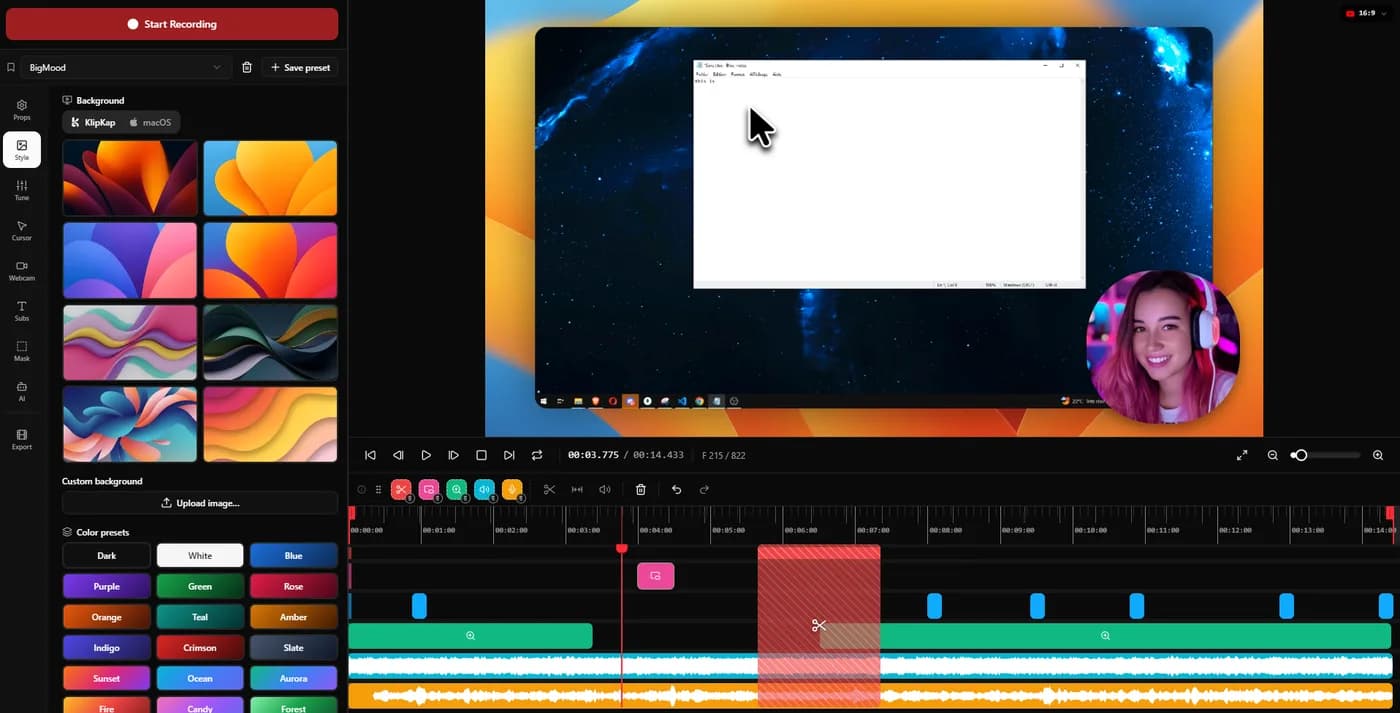
The useful question is not whether a tool zooms automatically but whether the result stays editable afterwards, because the automatic pass will be wrong two or three times in any real two-minute recording.
KlipKap Pro
Every zoom stays editable, each one can flip between following the cursor and holding a fixed frame, and three dials set the default behaviour once. The same engine and the same controls run on Windows and on Intel Macs.
Tight Studio
Tight Studio does this properly and deserves the credit: its zooms remain editable after the recording and each can be retargeted. The constraint is who can run it, because its own FAQ states it supports Apple chip Macs only.
A tie on the model, which is rarer than it sounds, and KlipKap Pro on reach. For an Intel Mac or any Windows machine the comparison does not start.
Which machines it runs on
Before any feature matters, the application has to start. Teams are rarely all on one platform, and a tool half the team cannot open produces recordings that do not match.
KlipKap Pro
Windows 10 and 11, and macOS 13 Ventura or later, with the same features, the same interface and the same price on both.
Tight Studio
Tight Studio is macOS only. For a Windows machine it is not a purchase decision at all.
KlipKap Pro. This row ends the comparison outright for a large share of readers, and it does not rest on judgement.
Where the AI actually runs
Most of these render video on your machine. Far fewer run the AI that way. Transcription, voice cleanup and silence removal are usually sent to a vendor API, which is why those products sell credits that expire: you cannot meter computation happening on a processor you already own.
KlipKap Pro
Transcription, voice repair and silence removal all run on-device, with a choice of model size. No API key, no per-minute charge, no allowance to run down, and no audio leaving the machine at any stage.
Tight Studio
AI voiceover, voice cloning and caption features are metered, with trial credits on the free tier and the full set on the $24 a month Pro plan. Metering is what a vendor does when the work runs on their infrastructure.
KlipKap Pro. The credit meter is the tell, and it is printed on the other vendor's own pricing page.
What it costs once you use the features
A free tier is only the price of finding out. The number that matters is what you pay once the tool is part of how you work.
KlipKap Pro
$25.49 once, with every feature included and nothing metered. The free tier is permanent at 720p with a watermark.
Tight Studio
Plus is $9 a month billed yearly, so $108 a year, the same as Screen Studio. Pro is $24 a month, so $288 a year, which is the most expensive plan in this comparison. The AI features that set the product apart sit on those plans.
KlipKap Pro. A single payment against $108 or $288 every year.
The pointer itself
In a screen-led video the cursor is what the viewer follows. A captured pointer is whatever the operating system drew at the time, usually too small to read once the video sits at half width on a page.
KlipKap Pro
The cursor has its own panel: twelve styles including animated ones, adjustable size and shadow, a tilt toggle that leans it into its direction of travel, and an option to hide it whenever it stops moving. It is redrawn at export rather than captured, so all of that can change after the recording exists.
Tight Studio
Cursor animations are included and its zooms stay editable after recording, with each one switchable between cursor tracking and a fixed frame. A twelve-style pointer library with tilt and hide-when-idle is not documented.
KlipKap Pro. Smoothing the path is common; changing what the viewer is actually looking at is not.
Repairing the audio you actually recorded
A good take with bad audio is an unusable take, and re-recording is the expensive fix. What matters is whether the repair lives in the same application or means exporting to something else.
KlipKap Pro
Six controls applied at export rather than baked in: cleanup for low-frequency rumble, adaptive noise suppression, bass boost, voice clarity, voice boost and a de-esser around 7 kHz. Silent stretches are detected and removed automatically, which is the biggest single saving on a long unscripted take.
Tight Studio
Automatic microphone cleanup and silence removal are not part of the product, which its own comparison page states.
KlipKap Pro. One-button cleanup covers the ordinary case; six controls plus silence trimming cover the take you would otherwise shoot again.
Current plans
KlipKap Pro
- Pro: $25.49 once, updates included, no renewal
- Free: permanent, 720p with a watermark, no time limit
- Windows 10/11 and macOS 13 or later, same price on both
- One account, unlimited machines, no device count to manage
- 14-day money-back guarantee
Tight Studio
- Free tier, AI features limited to trial credits
- Plus: $9/month billed yearly, so $108/year
- Pro: $24/month billed yearly, so $288/year
- macOS only, Windows on a waitlist
When to choose KlipKap Pro
The same model, on more machines
Tight Studio gets the model right, and it is worth saying so: its zooms stay editable after the recording and each one can flip between tracking the cursor and holding a fixed frame. That is the correct design and most of this category does not do it. KlipKap Pro works the same way and reaches further: the same engine and the same controls run on Windows and on Intel Macs, neither of which Tight Studio supports, and nothing in the pipeline is metered.
You need Windows now
A waitlist is a plan, not a build. It does not help anyone who has to record a Windows application this quarter.
You do not want a meter on your captions
Transcription and audio repair run on your own processor, so there is no allowance to watch and nothing stops mid-project.
You want audio repair in the same app
Six voice controls and automatic silence removal, which Tight Studio does not offer at any tier.
When Tight Studio is the better fit
You want AI narration or voice cloning
Generating a voice you never recorded, with an on-screen teleprompter, is genuinely theirs. Nothing in this comparison matches it, and KlipKap processes the voice you record rather than replacing it.
You record to a written script
Their teleprompter puts the script on screen while you record, which suits anyone who writes the narration first and reads it rather than talking through the product. KlipKap Pro works from the audio you actually record.
You want multi-clip recording built around retakes
Recording a long piece in several takes and assembling them is a workflow they have built around deliberately.
Can you use both?
Only if you are on a Mac and want AI narration occasionally. The two overlap heavily on the core workflow, so running both mostly means paying twice for the same thing.
Frequently asked questions
- Does Tight Studio work on Windows?
- Not yet. Its site offers a Windows waitlist rather than a download. On Windows today the realistic options are KlipKap Pro and FocuSee.
- Which is cheaper over a year?
- KlipKap Pro at $25.49 once. Tight Studio Plus is $108 a year and Pro is $288 a year, and its free tier limits the AI features to trial credits.
- Which has better captions?
- Both do word-level highlighting. KlipKap transcribes on-device with no allowance, so captions never stop working; Tight Studio meters its AI features, which is the practical difference on a busy week.
- What does Tight Studio do that KlipKap does not?
- AI narration with voice cloning, and an on-screen teleprompter. If a synthetic voice is part of your workflow, that is a real reason to choose it.
Related comparisons
vs KlipKap Pro vs Screen StudioCross-platform licence against a Mac-only subscriptionvs
 KlipKap Pro vs CursorClipTwo one-time purchases, one of them Mac onlyvs
 KlipKap Pro vs FocuSeeWhat a lifetime licence actually coversvs
 KlipKap Pro vs TellaDocumenting the interface against framing the presentervs
 KlipKap Pro vs LoomProducing video against sending itvs
 KlipKap Pro vs Screen CharmA focused subset against the full workflowvs
 KlipKap Pro vs CapOpen source against a finished workflowvs
 KlipKap Pro vs CamtasiaA demo tool against a course toolvs
 KlipKap Pro vs OBS StudioEditing after against broadcasting livevs
 KlipKap Pro vs CleanShot XVideo production against screen capture
Disclosure: this article is published by the team behind KlipKap Pro, one of the tools compared. Every price and platform claim is sourced below so you can check it rather than take our word for it. KlipKap has a free tier if you want to test it against the alternatives yourself.
Sources
Prices and platform support come from each vendor’s own pricing page, linked below. Software changes; if you spot something out of date here, tell us at contact@klipkap.pro and we will correct it.