 vs
vs
KlipKap Pro vs Camtasia: a demo tool or a course tool
Updated September 2026 · we make KlipKap, so weigh the opinion accordingly. Every Camtasia figure below comes from their own public pages and is linked at the bottom.
The short version
KlipKap Pro, for product demos and software tutorials. Camtasia is a serious multi-track editor with two decades of training features behind it, and for building a curriculum with quizzes and SCORM export nothing here competes. But it is a manual timeline: the polish is work you do. KlipKap Pro places the zooms, smooths the cursor, cleans the audio and cuts the silence automatically, for a single payment against $179.88 every year.
How we checked. The KlipKap column comes from using the product. Every Camtasia claim comes from their own pricing and feature pages rather than from a review site, and where we could not confirm something we say so instead of filling the gap. Feature availability changes; the date at the top is when this was last verified.
Who does the editing
Both can produce a polished result. The question is how many hours sit between the raw capture and that result, and whether those hours are yours.
KlipKap Pro
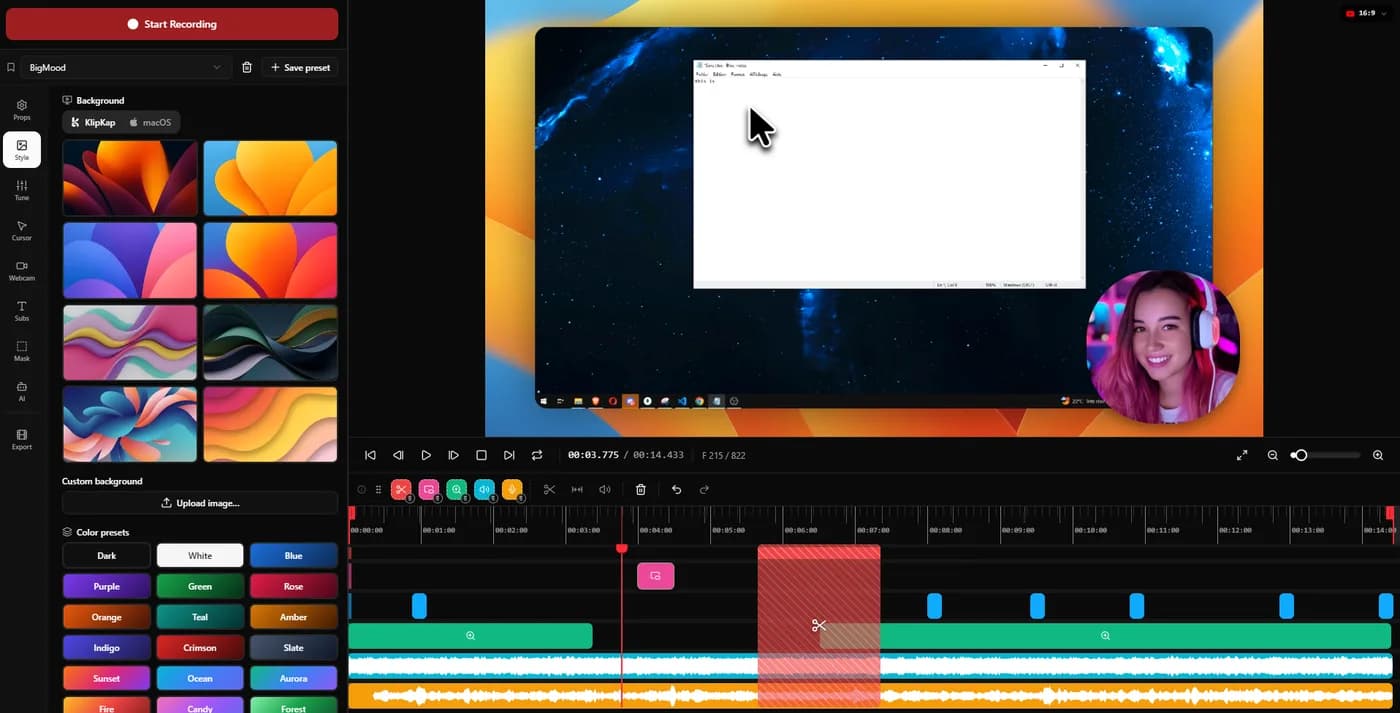
Zoom placed automatically around clicks with three adjustable dials, cursor smoothed and restyled, silences detected and cut, audio repaired at export. A usable video comes out of the first pass, and the controls exist to correct it.
Camtasia
A full timeline. Camtasia can produce anything, and everything is something you assemble: keyframes, transitions, effects and audio work are yours to place.
KlipKap Pro for the weekly demo. Camtasia when the video needs constructing rather than polishing.
What it costs to keep
Professional editors price like professional tools. Whether that is justified depends entirely on how much of the tool you use.
KlipKap Pro
$25.49 once, updates included, with a permanent free tier to evaluate.
Camtasia
From $179.88 a year for Essentials, rising through the tiers. No free tier.
KlipKap Pro. One payment against $179.88 every year is a difference of around $875 over five years.
Where the AI actually runs
Most of these render video on your machine. Far fewer run the AI that way. Transcription, voice cleanup and silence removal are usually sent to a vendor API, which is why those products sell credits that expire: you cannot meter computation happening on a processor you already own.
KlipKap Pro
Transcription, voice repair and silence removal all run on-device, with a choice of model size. No API key, no per-minute charge, no allowance to run down, and no audio leaving the machine at any stage.
Camtasia
Camtasia includes AI features across its tiers; where that processing happens is not documented in a way we can confirm, so we do not claim it either way.
KlipKap Pro. The credit meter is the tell, and it is printed on the other vendor's own pricing page.
What comes out, and how long it takes
Export is where a quick edit turns into a slow afternoon. Resolution and frame rate set the ceiling; whether the render uses the GPU decides whether a ten-minute 4K piece is a coffee break or a lunch break.
KlipKap Pro
MP4 and GIF, up to 4K, at 24, 30, 60 or 120 fps, GPU-accelerated. Six aspect ratios cover YouTube, TikTok and Instagram, X, LinkedIn and Facebook alongside the source dimensions, so a 16:9 demo becomes a 9:16 clip without reframing by hand.
Camtasia
Broad export options including formats and integrations aimed at training delivery. 120 fps and GPU-accelerated rendering are not documented in a way we can confirm.
KlipKap Pro. 4K at 120 fps with GPU acceleration is not matched in this category outside OBS, which is a live-streaming tool rather than an editor.
Current plans
KlipKap Pro
- Pro: $25.49 once, updates included, no renewal
- Free: permanent, 720p with a watermark, no time limit
- Windows 10/11 and macOS 13 or later, same price on both
- One account, unlimited machines, no device count to manage
- 14-day money-back guarantee
Camtasia
- From $179.88/year (Essentials)
- Higher tiers for teams and advanced features
- No free tier
- Windows and macOS
When to choose KlipKap Pro
In Camtasia, you are the engine
Camtasia has the deeper editor and it is not close: multi-track, effects, quizzes, SCORM. What it does not have is an automatic pass. Every zoom is a keyframe you place, ease and time by hand, which is precise, unlimited and slow, and on a course that runs to hours the precision is worth the hours. On a two-minute product demo it is roughly an hour of work that KlipKap Pro's engine does in one pass and lets you correct in a minute.
Your videos are demos, not courses
Product walkthroughs, feature announcements and tutorials come out of the first pass instead of being assembled.
You do not want to learn a timeline
Camtasia rewards investment. If nobody on the team wants to make that investment, the depth is cost rather than value.
The price over time
$25.49 once against $179.88 a year, which is the most expensive option in this comparison.
When Camtasia is the better fit
You are building training material
Quizzes, SCORM export, PowerPoint import and a real multi-track timeline. If your output is a curriculum, this is the right category of tool and KlipKap is not.
You need multi-track control
Layering several video sources with complex transitions is what a timeline editor is for. KlipKap is deliberately not one.
You want one tool for everything
Camtasia covers screen recording, editing, effects and delivery in one place, which suits teams that would rather standardise than assemble.
Can you use both?
Quite reasonably. KlipKap for the demos that ship weekly, Camtasia for the course you build once a year. They are different categories rather than competitors.
Frequently asked questions
- Is KlipKap Pro a Camtasia alternative?
- For product demos and software tutorials, yes, and for a fraction of the price: $25.49 once against $179.88 a year. For multi-track training production with quizzes and SCORM, no, and it does not try to be.
- Which is easier to learn?
- KlipKap Pro, by design. The zooms, cursor treatment and silence cuts are applied automatically and then adjusted; Camtasia expects you to build the result on a timeline.
- Which is cheaper?
- KlipKap Pro at $25.49 once. Camtasia starts at $179.88 a year, so the difference across five years is roughly $875.
Related comparisons
vs KlipKap Pro vs Screen StudioCross-platform licence against a Mac-only subscriptionvs
 KlipKap Pro vs CursorClipTwo one-time purchases, one of them Mac onlyvs
 KlipKap Pro vs FocuSeeWhat a lifetime licence actually coversvs
 KlipKap Pro vs Tight StudioOn-device AI against metered creditsvs
 KlipKap Pro vs TellaDocumenting the interface against framing the presentervs
 KlipKap Pro vs LoomProducing video against sending itvs
 KlipKap Pro vs Screen CharmA focused subset against the full workflowvs
 KlipKap Pro vs CapOpen source against a finished workflowvs
 KlipKap Pro vs OBS StudioEditing after against broadcasting livevs
 KlipKap Pro vs CleanShot XVideo production against screen capture
Disclosure: this article is published by the team behind KlipKap Pro, one of the tools compared. Every price and platform claim is sourced below so you can check it rather than take our word for it. KlipKap has a free tier if you want to test it against the alternatives yourself.
Sources
Prices and platform support come from each vendor’s own pricing page, linked below. Software changes; if you spot something out of date here, tell us at contact@klipkap.pro and we will correct it.