Screen recordingthat editsitself.
Trusted by teams using KlipKap
 Statflows
 BestProteinDz
 GlintEcom
 GorillaWearDzStatflowsBestProteinDzGlintEcomGorillaWearDz
Three steps. Zero friction.
KlipKap was designed so you spend your time on content, not on tooling.
Record
Select your screen, window, or custom region. Hit record. Screen, webcam, and all audio sources capture simultaneously, perfectly synced from frame one.
Auto-Edit
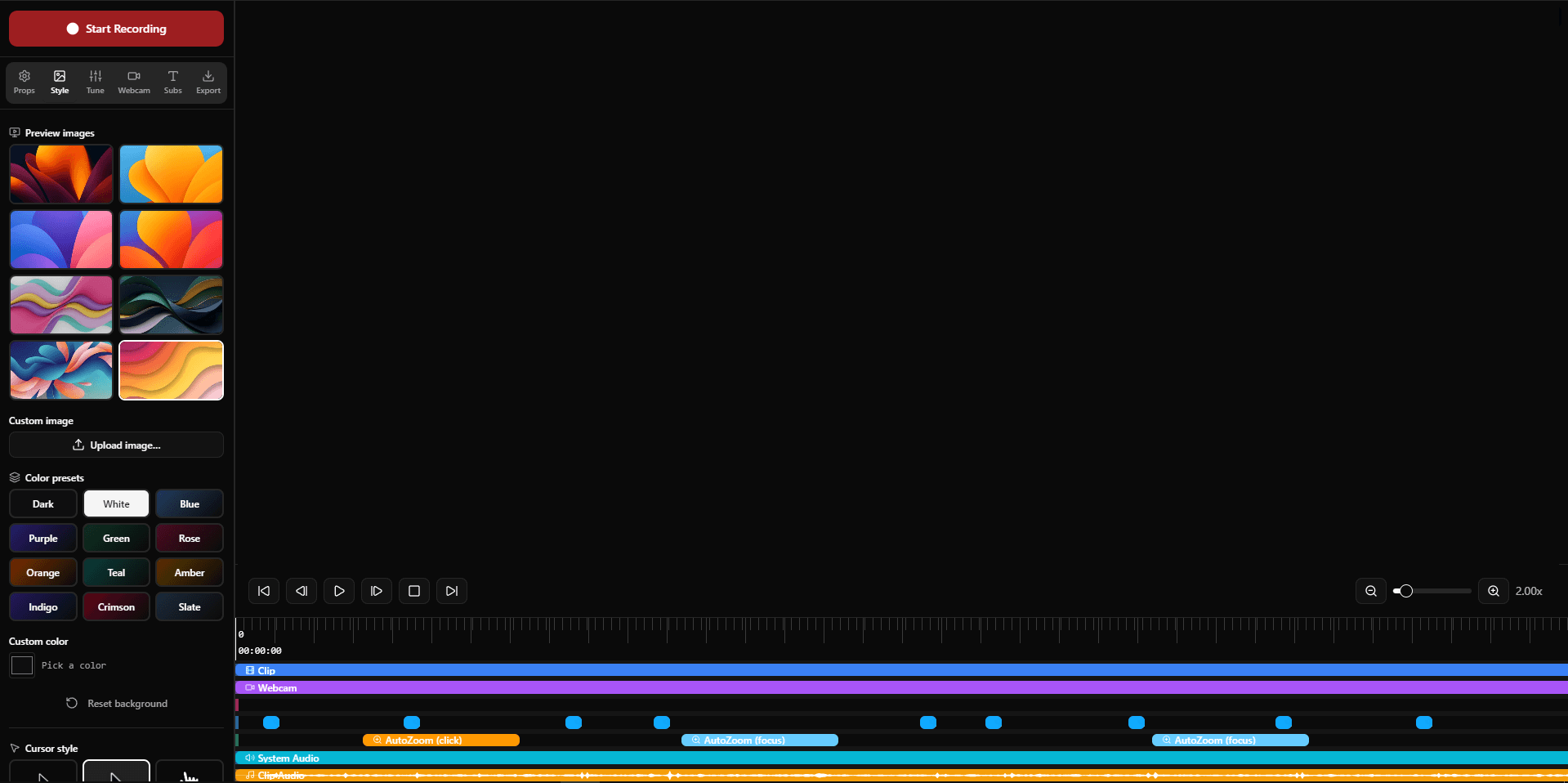
KlipKap edits for you. Auto-zoom on every click, AI noise removal, instant subtitles, animated webcam PiP, applied the moment you stop recording. No timeline scrubbing required.
Export
Pick your platform. KlipKap outputs the right format, resolution, and aspect ratio for YouTube, TikTok, LinkedIn, and more. Watermark-free on Pro.
Record
Select your screen, window, or custom region. Hit record. Screen, webcam, and all audio sources capture simultaneously, perfectly synced from frame one.
Auto-Edit
KlipKap edits for you. Auto-zoom on every click, AI noise removal, instant subtitles, animated webcam PiP, applied the moment you stop recording. No timeline scrubbing required.
Export
Pick your platform. KlipKap outputs the right format, resolution, and aspect ratio for YouTube, TikTok, LinkedIn, and more. Watermark-free on Pro.
The most polished records you can ship.
Cinematic results, zero effort.
KlipKap applies professional effects automatically, smooth cursor, smart zoom, AI subtitles, so your recordings look edited even when they aren't.
Your voice, perfected by AI.
From raw recordings to studio-quality audio and word-perfect transcriptions. KlipKap's AI handles the technical heavy lifting, automatically.
Original
Raw input
AI Enhanced
Noise removed
Built for anyone who records screens.
Whether you ship software, teach online, or grow an audience, KlipKap turns raw recordings into polished content without the friction.
Ship faster with video
Replace long spec docs and Slack threads with a 2-minute walkthrough. Record a bug, demo a PR, or narrate a changelog, polished in minutes.
- Record bug reproductions with cursor highlight
- Async demos for product reviews & standups
- Changelog videos with auto-zoom on key actions
Tutorials that look pro
From raw screen recording to upload-ready tutorial in one session. Auto-zoom, smooth cursor, and AI subtitles make every video feel hand-crafted.
- AI subtitles in 50+ languages, fully offline
- Cinematic cursor & auto-zoom on every click
- One-click export for YouTube, TikTok & Shorts
Product videos, no agency
Produce polished product walkthroughs and feature announcements in-house. No Figma handoffs, no editing contractors.
- Social-ready formats: 16:9, 9:16, 1:1, 4:5
- Animated backgrounds for on-brand exports
- Webcam PiP with auto-framing for face-cam
Course content at scale
Record once, publish everywhere. Full subtitles, audio cleanup, and chapter-ready exports make it easy to build a professional training library.
- Multi-source audio with noise suppression
- Accurate word-level subtitle timing
- Non-linear editor for chapter cuts
Every alternative has a catch.
Free tools trade your time. Cloud apps trade your privacy and your wallet. KlipKap trades nothing.
Free. Fragmented. Slow.
You keep the money. You spend the hours.
- Record in one app, edit in another, subtitle in a third
- Auto-zoom and cursor effects need manual keyframing
- Aspect ratio exports require setup from scratch each time
- AI subtitles means installing a separate tool
- Three windows open. One raw file as output.
Complete. Local. Yours.
One app. One price. Everything works out of the box.
- Record, edit & export. Never leave the app.
- Auto-zoom on every click, built-in and automatic
- Cinematic cursor smoothing, no keyframes needed
- Social exports: all formats, one click each
- AI subtitles: offline, 50+ languages, no credits
- AI audio cleanup: no plugins, no cloud processing
- Footage stays on your machine, always
Polished. Rented. Dependent.
You save time. You pay for it every month.
- Monthly fee, whether you ship videos that month or not
- Your footage is processed and stored on their servers
- No internet connection, no access to your own work
- AI subtitles consume credits. Top up to keep going.
- Cancel your plan, lose access to your projects
Loved by creators worldwide.
Real reviews from Uneed - verified purchases, no filters.
Pay once. Own it forever.
KlipKap Pro is a one-time purchase. No subscription, no renewal. Pay once, own every future update.
Unlocked with Pro
Your questions, answered.
Yes. KlipKap Pro is a one-time purchase, no subscription, no monthly fee, no renewal. You pay once and own the software forever, including all future updates for your licensed version.
As many as you like. The licence lives on your account rather than on a machine, and the same account signs in on Windows and macOS, so a desktop, a laptop and a spare are all covered by one purchase. There is no device count to manage and no deactivation step when you change machine.
No. Your one-time purchase covers ongoing updates. You won't be asked to pay again.
KlipKap has a permanent free tier, not a trial. You can record, edit, and export in 720p with a watermark at no cost, with no time limit. Upgrade to Pro to remove the watermark and unlock higher resolutions, higher frame rates, and more export options.
Yes. If KlipKap doesn't work for your use case, contact contact@klipkap.pro within 14 days of purchase for a full refund, no questions asked.
When you record your screen, your cursor often moves in a shaky, erratic way, especially during demos. KlipKap's smooth mouse movement automatically converts those jerky cursor paths into a fluid, intentional cinematic glide during playback and export. The result looks like you spent time editing the cursor in post-production, even though you didn't touch anything.
OBS is a powerful broadcaster, not a polished recording app. It has no built-in editor, no zoom animations, no cursor effects, and no AI subtitles. Combining OBS with a separate editor means maintaining two complex tools and spending far more time in post. KlipKap handles everything in one interface: record, edit, apply effects, add subtitles, and export, without leaving the app.
Yes, for everything that touches your footage. Recording, editing, AI subtitles and AI audio cleanup all execute on your own machine: the video and audio are never uploaded, and transcription needs no API key, no account and no per-minute credits. Three things do need a connection, and only these three: downloading the app, activating your licence, and exporting with a Pro account.
Yes, natively, no plugin required. KlipKap captures system audio directly alongside your microphone and webcam. You can mix them independently in the timeline. This is something Mac-only alternatives require a third-party virtual audio cable for.
KlipKap runs AI transcription locally on your machine. After recording, trigger transcription in the editor and it generates word-level subtitles with precise timing. Everything runs offline, no API key, no account, no usage limits. Supports 50+ languages.
Windows 10/11 or macOS 13 Ventura or later. Both x64 and ARM64 processors are supported, so Intel Macs run it as well as Apple Silicon. At least 4 GB RAM recommended; 8 GB+ for 4K recording. A GPU is recommended for hardware-accelerated capture but not required.
KlipKap is available on Windows 10/11 and macOS 13 Ventura or later. Both platforms get the same features and the same one-time price.
Yes, and it goes further. Screen Studio is a Mac-only app with an annual subscription. KlipKap Pro offers the same smooth mouse movement, automatic zoom animations, and cursor effects, but runs on both Windows and Mac with a one-time purchase. If you've been looking for Screen Studio on Windows, KlipKap is the answer.
Get started free
Record once.
Look polished.
Cinematic zoom, smooth cursor, AI subtitles, social exports, all in one app. No subscriptions, no learning curve.