 vs
vs
KlipKap Pro vs Cap: open source or a finished workflow
Updated September 2026 · we make KlipKap, so weigh the opinion accordingly. Every Cap figure below comes from their own public pages and is linked at the bottom.
The short version
KlipKap Pro, unless open source is the requirement. Cap is a genuinely open project, and it is the only tool in this comparison that also runs on Linux. But its Desktop tier is $29 billed yearly rather than a one-time purchase, commercial use is gated behind that tier, and its AI features are cloud-side. KlipKap Pro is a single payment with the AI on-device and a deeper editing toolkit.
How we checked. The KlipKap column comes from using the product. Every Cap claim comes from their own pricing and feature pages rather than from a review site, and where we could not confirm something we say so instead of filling the gap. Feature availability changes; the date at the top is when this was last verified.
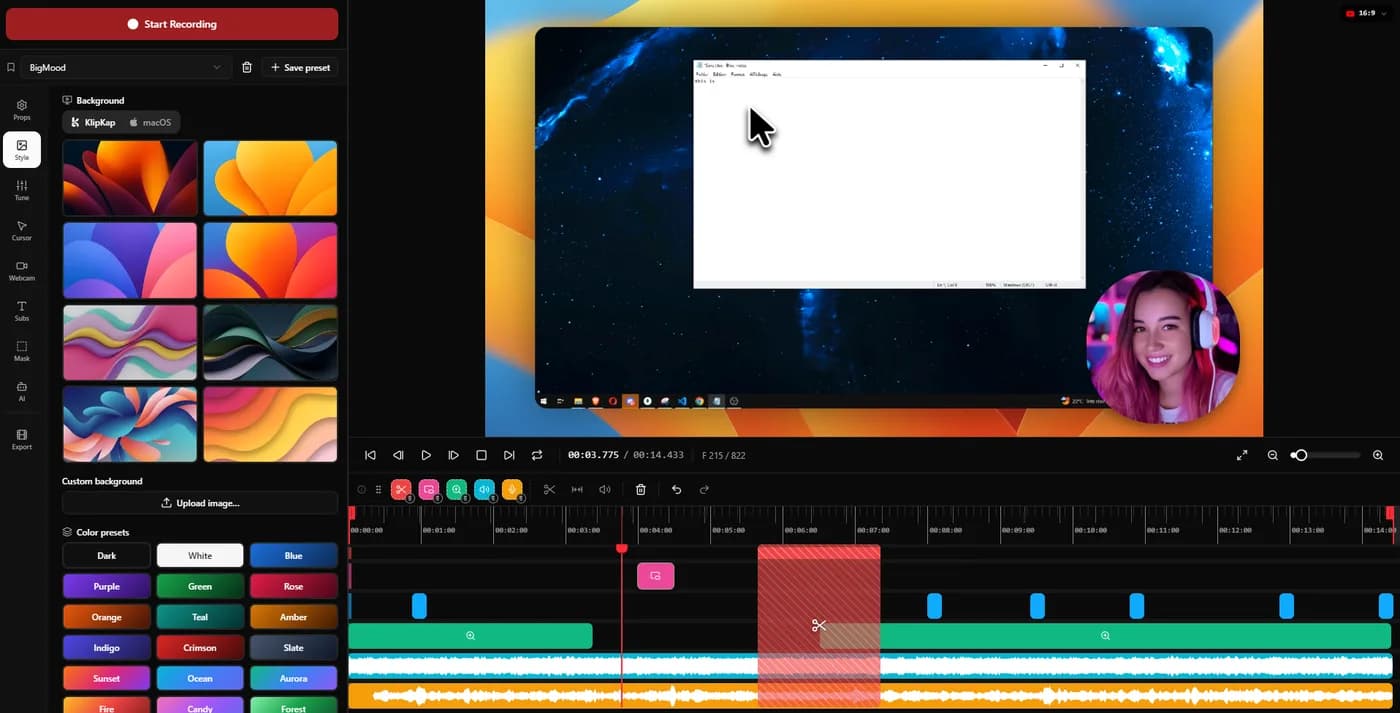
Reading the zoom implementation, or tuning it
Every tool here claims its automatic zoom looks good and none of them can show you why. There are two honest answers to that: publish the code, or expose the controls.
KlipKap Pro
The controls. The engine is closed and written in-house, and what that buys is that the behaviour is ours to move: intensity, cursor smoothing and zoom speed as dials, per-zoom retargeting, and a curve that changes when enough people say it should.
Cap
Cap takes the other answer and it is a real advantage: the project is open source, so the zoom implementation and its defaults are public and you can read them rather than take anyone's word. What you take on with it is the paid tier for commercial work, billed yearly.
Genuinely split. Cap if being able to audit the implementation matters more than tuning it, KlipKap Pro if it is the other way round.
What you are actually buying
Open source and one-time purchase sound like the same kind of freedom and are not. One is about the code, the other about the invoice, and a product can offer either without the other.
KlipKap Pro
$25.49 once, updates included, no renewal, and the licence covers commercial work from the first minute.
Cap
AGPL source you can read or self-host. The Desktop tier is $29 per licence billed yearly, so it renews; the perpetual free tier is licensed for personal use, which means commercial recording means paying.
KlipKap Pro on the invoice, Cap on the code. The $29 Desktop tier is an annual charge, not a purchase.
Where the AI actually runs
Most of these render video on your machine. Far fewer run the AI that way. Transcription, voice cleanup and silence removal are usually sent to a vendor API, which is why those products sell credits that expire: you cannot meter computation happening on a processor you already own.
KlipKap Pro
Transcription, voice repair and silence removal all run on-device, with a choice of model size. No API key, no per-minute charge, no allowance to run down, and no audio leaving the machine at any stage.
Cap
Auto-generated titles, summaries, chapters and transcription sit on the Pro cloud plan at $8.16 per user per month, which places that processing on their infrastructure rather than yours.
KlipKap Pro. The credit meter is the tell, and it is printed on the other vendor's own pricing page.
How much editing the app does
Both record and both have an editor. What separates them is how much of the polish is automatic and how much of it you can then correct.
KlipKap Pro
Three-axis auto-zoom with per-zoom manual targeting, twelve cursor styles with tilt and hide-when-idle, six voice repair controls, automatic silence removal, and window styling from shadow to padding.
Cap
Studio Mode is an editor with automatic zoom and 4K 60fps export. Cursor restyling, granular voice repair and silence trimming are not documented.
KlipKap Pro on depth. Per-zoom targeting, twelve cursor styles and six voice controls have no equivalent on the other side.
What comes out, and how long it takes
Export is where a quick edit turns into a slow afternoon. Resolution and frame rate set the ceiling; whether the render uses the GPU decides whether a ten-minute 4K piece is a coffee break or a lunch break.
KlipKap Pro
MP4 and GIF, up to 4K, at 24, 30, 60 or 120 fps, GPU-accelerated. Six aspect ratios cover YouTube, TikTok and Instagram, X, LinkedIn and Facebook alongside the source dimensions, so a 16:9 demo becomes a 9:16 clip without reframing by hand.
Cap
4K at 60 fps. 120 fps and GPU-accelerated rendering are not documented.
KlipKap Pro. 4K at 120 fps with GPU acceleration is not matched in this category outside OBS, which is a live-streaming tool rather than an editor.
Current plans
KlipKap Pro
- Pro: $25.49 once, updates included, no renewal
- Free: permanent, 720p with a watermark, no time limit
- Windows 10/11 and macOS 13 or later, same price on both
- One account, unlimited machines, no device count to manage
- 14-day money-back guarantee
Cap
- Free: personal use only, commercial work excluded
- Desktop: $29 per licence billed yearly, commercial rights
- Pro: $8.16/user/month billed annually, cloud features
- macOS, Windows and Linux, AGPL source
When to choose KlipKap Pro
Reading the engine, against tuning it
Cap has the advantage here and it is worth stating plainly: it is open source, so you can read exactly how its zoom is implemented and what its defaults are, which is more than any assurance from us is worth. What you give up is not the code but the surface. KlipKap Pro's engine is closed and written in-house, and what that buys is that the behaviour is ours to change: when someone reports that a zoom reads as too aggressive on a 4K panel, that is a tuning decision rather than a pull request and a maintainer's calendar.
You want one payment, not a yearly one
$25.49 once against $29 every year for the Desktop tier, and commercial use included rather than gated.
The AI has to stay on your machine
Transcription and audio work run on-device here; on Cap they belong to the cloud plan.
You want deeper correction controls
Per-zoom targeting, twelve cursor styles and six voice controls, none of which Cap documents.
When Cap is the better fit
Open source is a requirement
AGPL source you can audit, fork or self-host. If that is a procurement condition or a personal principle, nothing here competes and we would not pretend otherwise.
You are on Linux
Cap is the only tool in this comparison that runs there. KlipKap has no Linux build yet, though one is in development.
You want recordings hosted behind a link
Their cloud plan stores recordings and gives each one a shareable page, closer to how Loom works than to a local export. KlipKap Pro produces a file and leaves distribution to you.
Can you use both?
Only if the reason is Linux or the source code itself. On Windows and macOS the two cover the same ground, so running both means learning two editors to do one job.
Frequently asked questions
- Is Cap's $29 tier a one-time purchase?
- No. Their pricing page lists Desktop at $29 per licence billed yearly, so it renews. KlipKap Pro is a single payment with updates included.
- Is Cap free for commercial use?
- The perpetual free tier is licensed for personal use. Commercial usage rights come with the Desktop tier at $29 a year.
- Does KlipKap run on Linux?
- Not yet; a build is in development but nothing is downloadable today. Cap is the option in this comparison that runs on Linux now.
- Which has better automatic zoom?
- KlipKap Pro exposes more control, with separate dials for depth, tracking and speed plus per-zoom manual targeting. Cap applies zoom in Studio Mode with fewer settings.
Related comparisons
vs KlipKap Pro vs Screen StudioCross-platform licence against a Mac-only subscriptionvs
 KlipKap Pro vs CursorClipTwo one-time purchases, one of them Mac onlyvs
 KlipKap Pro vs FocuSeeWhat a lifetime licence actually coversvs
 KlipKap Pro vs Tight StudioOn-device AI against metered creditsvs
 KlipKap Pro vs TellaDocumenting the interface against framing the presentervs
 KlipKap Pro vs LoomProducing video against sending itvs
 KlipKap Pro vs Screen CharmA focused subset against the full workflowvs
 KlipKap Pro vs CamtasiaA demo tool against a course toolvs
 KlipKap Pro vs OBS StudioEditing after against broadcasting livevs
 KlipKap Pro vs CleanShot XVideo production against screen capture
Disclosure: this article is published by the team behind KlipKap Pro, one of the tools compared. Every price and platform claim is sourced below so you can check it rather than take our word for it. KlipKap has a free tier if you want to test it against the alternatives yourself.
Sources
Prices and platform support come from each vendor’s own pricing page, linked below. Software changes; if you spot something out of date here, tell us at contact@klipkap.pro and we will correct it.