 vs
vs
KlipKap Pro vs OBS Studio: editing after or broadcasting live
Updated September 2026 · we make KlipKap, so weigh the opinion accordingly. Every OBS Studio figure below comes from their own public pages and is linked at the bottom.
The short version
KlipKap Pro, if the recording becomes a video. OBS is free, open source and the standard for live production, with control over sources, scenes and audio routing that nothing commercial matches. But it has no editor, no automatic zoom and no cursor treatment: what it captures is what you get, and turning that into a polished demo means a second application and a lot of manual work. KlipKap Pro does that part automatically.
How we checked. The KlipKap column comes from using the product. Every OBS Studio claim comes from their own pricing and feature pages rather than from a review site, and where we could not confirm something we say so instead of filling the gap. Feature availability changes; the date at the top is when this was last verified.
What each one is built to do
These are not really competitors, and treating them as such helps nobody. One is a live production desk, the other a post-capture editor, and the wrong choice is obvious within an hour.
KlipKap Pro
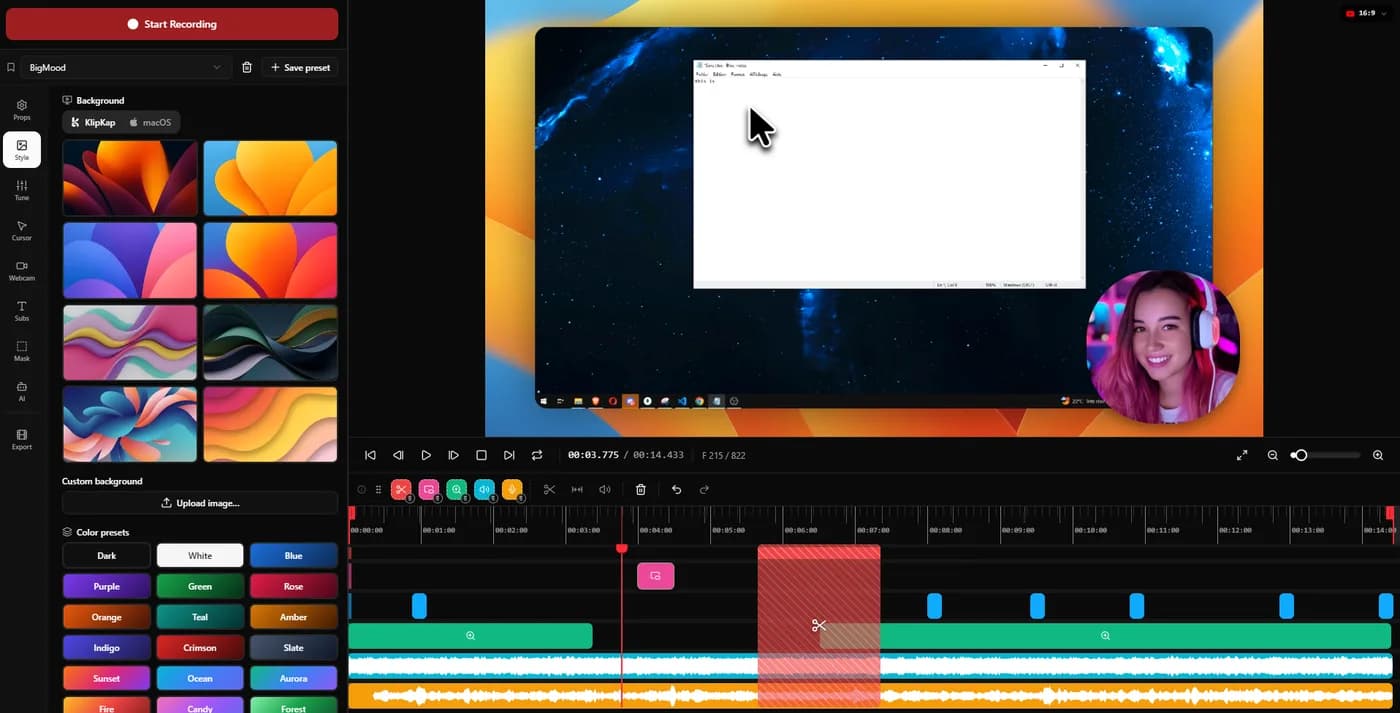
Record, then let the app place the zooms, smooth the cursor, cut the silences, caption the audio and export to the right ratio. Everything happens after the capture.
OBS Studio
Compose scenes, mix sources and audio, and broadcast or record the result in real time. Everything happens during the capture, and nothing happens afterwards.
KlipKap Pro for anything that gets edited. OBS for anything that goes out live, where KlipKap has nothing to offer at all.
Getting from capture to something watchable
A raw 1920-wide capture is legible to someone who already knows the product. On a landing page it asks a stranger to find the button you clicked.
KlipKap Pro
Automatic zoom with three dials, cursor smoothing and twelve pointer styles, backgrounds, padding and window shadow, word-level captions.
OBS Studio
None of it. OBS records the sources you configured, faithfully. Zoom, cursor treatment and captions are jobs for whatever you open next.
KlipKap Pro, comprehensively, and this is the whole reason the category exists.
What it costs
Free is a real advantage and it deserves to be stated plainly rather than argued around.
KlipKap Pro
$25.49 once, with a permanent free tier at 720p and a watermark.
OBS Studio
Free, entirely, with no tiers and no paid version. Open source, cross-platform, funded by donations.
OBS. Nothing beats free, and the question is only whether it does the job you need.
Repairing the audio you actually recorded
A good take with bad audio is an unusable take, and re-recording is the expensive fix. What matters is whether the repair lives in the same application or means exporting to something else.
KlipKap Pro
Six controls applied at export rather than baked in: cleanup for low-frequency rumble, adaptive noise suppression, bass boost, voice clarity, voice boost and a de-esser around 7 kHz. Silent stretches are detected and removed automatically, which is the biggest single saving on a long unscripted take.
OBS Studio
Audio filters including noise suppression are available and configurable, applied live rather than as a post-capture repair. Automatic silence removal has no equivalent, since there is no timeline to cut.
KlipKap Pro. One-button cleanup covers the ordinary case; six controls plus silence trimming cover the take you would otherwise shoot again.
Current plans
KlipKap Pro
- Pro: $25.49 once, updates included, no renewal
- Free: permanent, 720p with a watermark, no time limit
- Windows 10/11 and macOS 13 or later, same price on both
- One account, unlimited machines, no device count to manage
- 14-day money-back guarantee
OBS Studio
- Free, with no paid tier
- Open source, community funded
- Windows, macOS and Linux
- No built-in editor, no automatic zoom
When to choose KlipKap Pro
The engine is the part OBS leaves to you
OBS Studio is better than anything commercial at capture, scene composition and audio routing, and it applies no zoom, no cursor treatment and no framing whatsoever. There is nothing to compare between the two engines because OBS does not have one. The realistic comparison is between KlipKap Pro's automatic pass and an evening in a general-purpose editor keyframing the same zooms by hand, which is about an hour per two-minute demo and usually looks worse.
The recording becomes a video
Demos, tutorials and launch clips need editing. OBS ends where that work starts.
You do not want to learn a broadcast desk
OBS rewards configuration. For someone who just needs a clean walkthrough by Friday, that is a project rather than a tool.
Captions and audio repair in one place
On-device transcription, six voice controls and silence trimming, with no second application in the chain.
When OBS Studio is the better fit
You are streaming live
Scenes, sources, transitions and audio routing in real time. KlipKap does not stream at all, so there is no comparison to make.
You need it to cost nothing
Free, open source, no tiers. If budget is the binding constraint, this is the answer and we will not pretend otherwise.
You are on Linux
OBS runs there natively. KlipKap has no Linux build yet, though one is in development.
Can you use both?
Very commonly, and it is a sensible setup. OBS for live streams and complex multi-source captures, KlipKap for turning an ordinary screen recording into something publishable.
Frequently asked questions
- Is KlipKap Pro better than OBS?
- For producing edited demos and tutorials, yes: OBS has no editor, no automatic zoom and no cursor treatment. For live streaming, OBS is the right tool and KlipKap does not compete, because it does not stream.
- Can OBS do automatic zoom?
- No. It records the sources you configure without cinematic treatment. Zoom and cursor smoothing would be work for a separate editor afterwards.
- Is it worth paying when OBS is free?
- Only if the editing time is worth more than $25.49. If you record occasionally and do not mind assembling the polish yourself, OBS plus a free editor is a legitimate answer.
Related comparisons
vs KlipKap Pro vs Screen StudioCross-platform licence against a Mac-only subscriptionvs
 KlipKap Pro vs CursorClipTwo one-time purchases, one of them Mac onlyvs
 KlipKap Pro vs FocuSeeWhat a lifetime licence actually coversvs
 KlipKap Pro vs Tight StudioOn-device AI against metered creditsvs
 KlipKap Pro vs TellaDocumenting the interface against framing the presentervs
 KlipKap Pro vs LoomProducing video against sending itvs
 KlipKap Pro vs Screen CharmA focused subset against the full workflowvs
 KlipKap Pro vs CapOpen source against a finished workflowvs
 KlipKap Pro vs CamtasiaA demo tool against a course toolvs
 KlipKap Pro vs CleanShot XVideo production against screen capture
Disclosure: this article is published by the team behind KlipKap Pro, one of the tools compared. Every price and platform claim is sourced below so you can check it rather than take our word for it. KlipKap has a free tier if you want to test it against the alternatives yourself.
Sources
Prices and platform support come from each vendor’s own pricing page, linked below. Software changes; if you spot something out of date here, tell us at contact@klipkap.pro and we will correct it.