How to make an explainer video
- explainer videos
- marketing
- screen recording
An explainer follows an argument rather than a click path, so the cursor is a poor guide to where the frame should be. Script it first, record the screen material second, then set each zoom to a fixed target rather than letting it track the pointer. KlipKap Pro allows any individual zoom to be aimed with a crosshair, and its captions carry the explanation for the majority who watch without sound.
01An explainer is not a demo
A demo shows a product doing something. An explainer makes a case: here is the problem, here is why the obvious fix does not work, here is the idea. The screen is illustration rather than subject, which changes almost every decision that follows.
The most common failure is recording an explainer as though it were a demo, ending up with two minutes of an interface being operated while a voice talks about something more abstract than what is on screen.
- Write the script before you open the recorder, not after
- Decide what each sentence needs on screen, and cut the sentences that need nothing
- Sixty to ninety seconds for a landing page, up to three minutes for a considered purchase
- End on the idea, not on a button
02Write it, then read it out loud
An explainer is the one screen recording format where a written script is genuinely required, because the argument has to hold without the crutch of demonstrating something. Read it aloud before recording. Sentences that work on a page and not in a mouth are found here and nowhere else.
Time the read. A ninety second script is around 220 words at a comfortable pace, and scripts routinely come in at twice that on the first draft.
03Gather the screen material first
Record the screen sections separately from the narration rather than trying to do both live. Recording is controlled from the tray, and paused segments are stitched back together automatically, so a single recording with pauses between the pieces is easier to manage than six files.
The source picker takes a display, a window or a region drawn with the Area tab, which is what you want when the material is one diagram or one panel rather than a full application.
04Fixed-point zoom, not cursor tracking
This is the setting that matters most for explainers. Automatic zoom follows the cursor, which is correct for demos and wrong here, because in an explainer nobody is driving the interface. The frame needs to be where the argument is.
Any individual zoom can be switched off cursor-following and pointed at a fixed spot, set with a crosshair on a mini preview canvas. Combined with the intensity control from 1.0x to 4.0x and a slow zoom speed, that gives a deliberate move onto a specific part of a diagram, timed to the sentence that needs it.
05Open with a face, then get out of the way
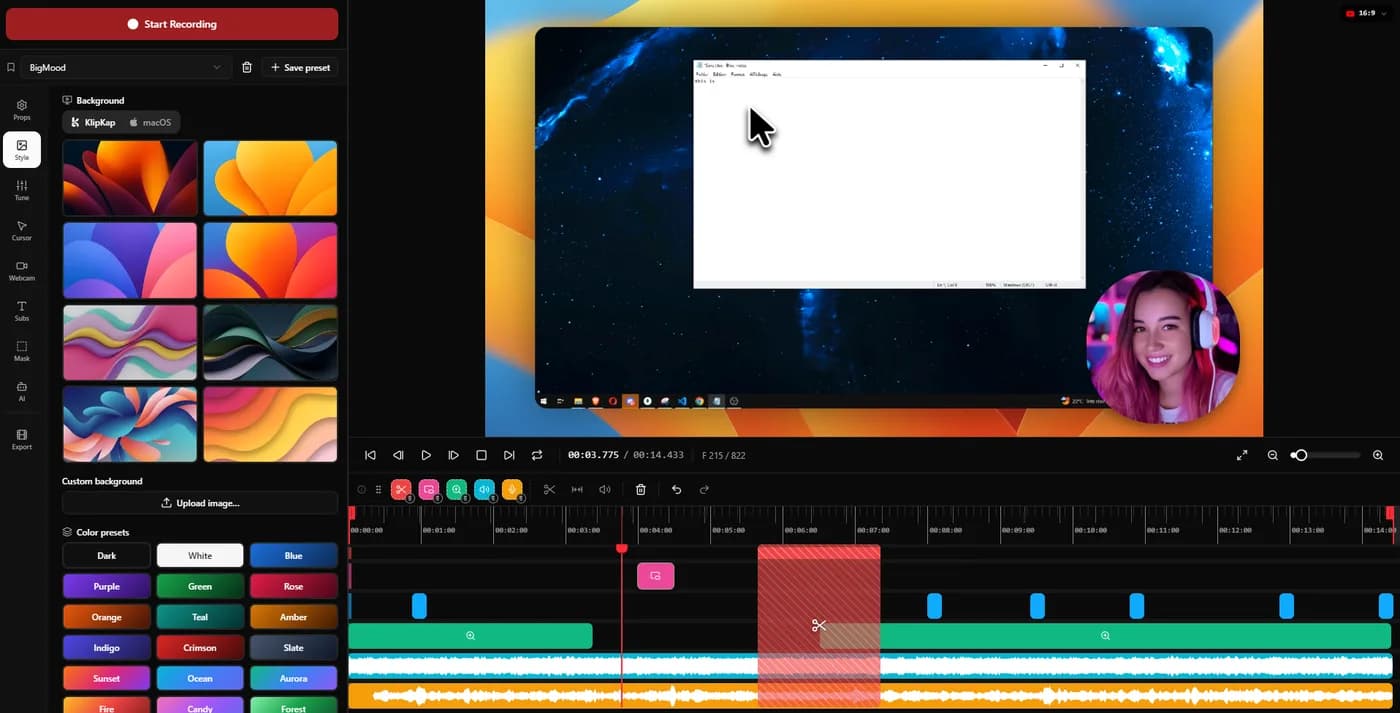
A face at the opening establishes who is making the argument, which an explainer needs more than a demo does. The webcam sits in one of eight positions at 5 to 40 percent of frame height with an adjustable corner radius, and a digital zoom of up to 3.0x crops into the camera feed itself.
After the opening, the frame belongs to what you are explaining. A permanent bubble in the corner of an explainer competes with the thing the viewer is being asked to understand.
06Captions carry the argument
Explainers are watched on mute more than any other format, because they are embedded in landing pages and social feeds that autoplay silently. If the argument only exists in the audio, most viewers never receive it.
Word level captions with progressive highlight, at an opacity you set, keep a scripted narration followable without sound. Transcription runs on your own machine with a choice of model sizes and is a Pro tier feature.
07A scripted read needs more audio work, not less
Reading a script produces a flatter delivery than talking through a product, and it exposes sibilance and room tone that conversational energy usually covers. The six voice processing controls handle it: cleanup, adaptive noise suppression, bass boost, voice clarity, voice boost and a de-esser around 7 kHz, applied at export rather than baked in.
Automatic silence trimming is less useful here than elsewhere, since a scripted read has few long pauses, and the pauses it does have are usually deliberate.
08Export square and vertical from the same project
Explainers earn their cost by being reused: the landing page, the social post, the sales deck, the onboarding email. Six aspect ratios including 1:1 and 9:16 mean those come out of one project rather than one recording each.
The Pro tier exports to 4K at up to 120 fps with GPU accelerated rendering. For a landing page embed, 1080p is usually the better trade, since the file has to load before the argument can start.
Quick tips
- 01Cut the first sentence of your script. It is almost always throat clearing.
- 02Record the narration in one pass. Splicing two takes of a scripted read is audible.
- 03Hold each zoom for the whole sentence it belongs to. Moves that arrive late are worse than no move.
- 04Show the diagram before you explain it, not while. People cannot read and listen at once.
- 05Watch it on mute before you publish. If the argument survives, the captions are doing their job.
Frequently asked questions
- How long should an explainer video be?
- Sixty to ninety seconds for a landing page, and up to three minutes when the purchase is considered and the audience arrived deliberately. Length is decided by how much the viewer has already invested in getting there, not by how much you have to say.
- Do I need animation for an explainer video?
- Not usually. Recorded screen material with deliberate zooms, a styled background and clear captions covers most explainers, and it can be updated when the product changes. Commissioned animation cannot, which is why so much of it goes stale.
- Why does cursor tracking not work for explainers?
- Because nobody is driving the interface. Automatic zoom follows the pointer, which is right for a demo and wrong for an argument. KlipKap Pro lets each zoom be switched off cursor-following and aimed at a fixed spot with a crosshair, so the frame follows the script instead.
- Should an explainer video have captions?
- Yes, and burnt in rather than platform generated. Explainers are embedded in pages and feeds that autoplay on mute, so an argument that exists only in the audio reaches a minority of viewers.
More ways people use KlipKap Pro
This guide is written by the team behind KlipKap Pro, a screen recorder and video editor for Windows 10 and 11 and macOS 13 or later. There is a permanent free tier at 720p if you want to try the workflow described here before paying for anything.